Write column prompts
The one skill that most improves your results.
A column prompt is the question answered for every row. Clear prompts give consistent, checkable answers. Vague prompts give vague answers, a thousand times over.
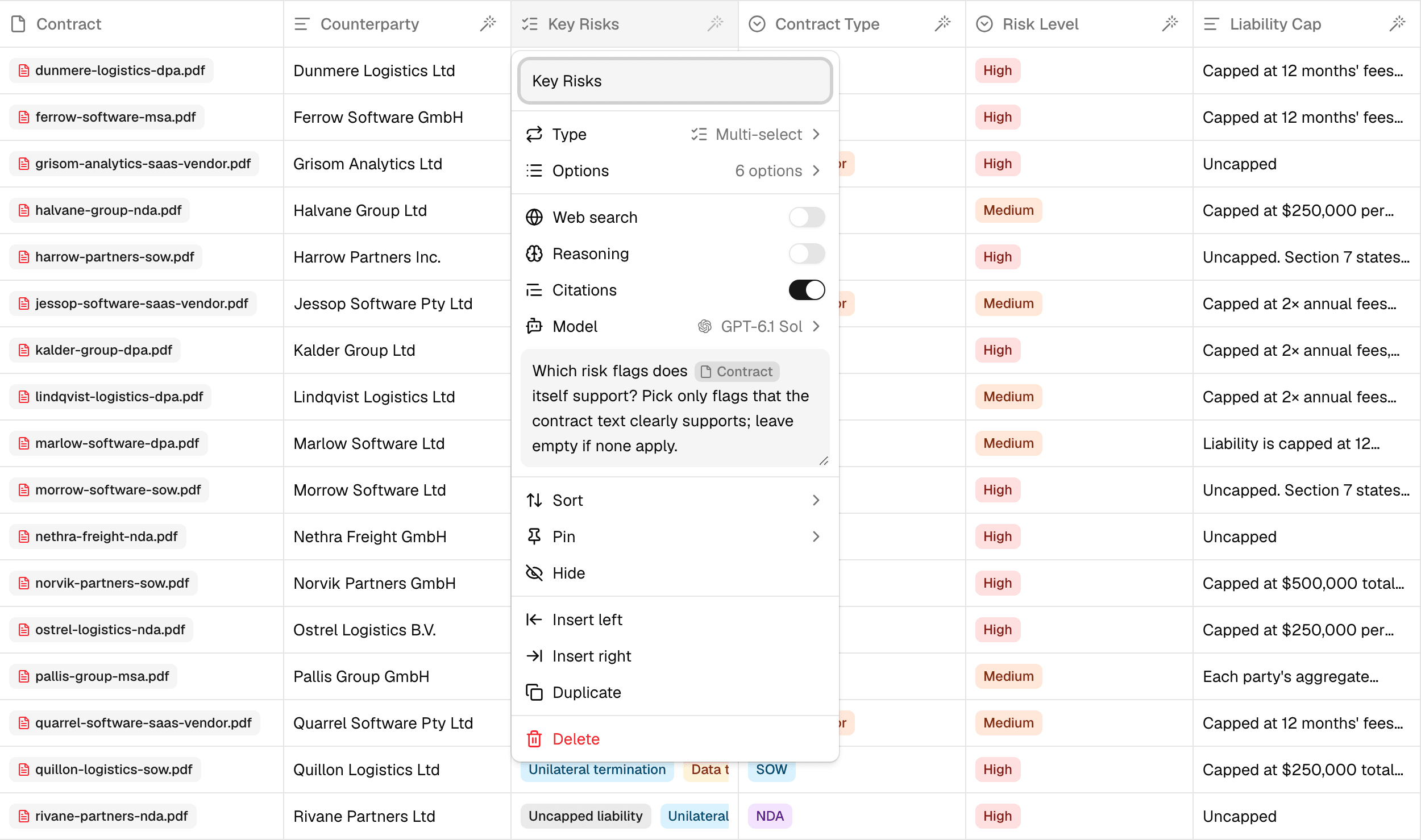
To write one, select a column's header and type into Prompt.
Write it for one row
The prompt runs once per row, so write it as a direct question about a single row. Type @ to mention the columns it should read. A mention appears in the prompt as a chip with the column's name. In these examples it's written as @Company.
| Weak | Strong |
|---|---|
| Research these companies | What was the latest funding round for @Company, and when was it announced? |
| Summarize | In two sentences, what does @Company sell, and to whom? |
| Risks? | Which risks does @Contract itself support? Pick only the ones the text clearly states. |
Every auto-fill prompt needs to mention at least one column. Usually that's the primary column.
Say what a good answer looks like
The agent only knows what you tell it. Spell out:
- The format. "Answer in one sentence." "Give the amount in USD, like $12M." "Use the date the agreement was signed, not the effective date."
- What to do when there's no answer. "If the contract doesn't mention a liability cap, write Not stated." Without this, the agent may guess.
- Which source to trust. "Use the company's own website or press releases."
Let the column type do the work
If the answers fall into a known set, use a select or multi-select column and list the options there, instead of describing them in the prompt. Every answer will be one of your options, so the column stays consistent and easy to filter.
Build on other columns
A prompt can mention another auto-fill column, which is then filled first, row by row:
- Key risks: Which risks does
@Contractclearly support? - Risk level: Based on
@Key risks, is this contract High, Medium, or Low risk?
Breaking a big question into steps like this gives better answers than one long prompt, and lets you check each step.
Prompts for documents
When a column reads a file, short documents are read in full. For long documents, the agent reads the passages most relevant to your prompt. A specific prompt ("What is the termination notice period in @Contract?") finds the right passage far more reliably than a broad one ("Summarize the key terms of @Contract").
Turn on Citations in the column settings to link each answer to the exact passage it came from. See Column settings.
Test before you run everything
Run a new prompt on a few rows first: hover a cell and select Run agent, or select a few rows and run them. Check the answers and their sources, adjust the prompt, then fill the rest. Cells you've already run are marked outdated when you edit the prompt, so you can refresh just those. See Run columns.
A prompt can be up to 1,000 characters.